Comparison Plugin
The purpose of this plugin is to visually compare multiple recordings.
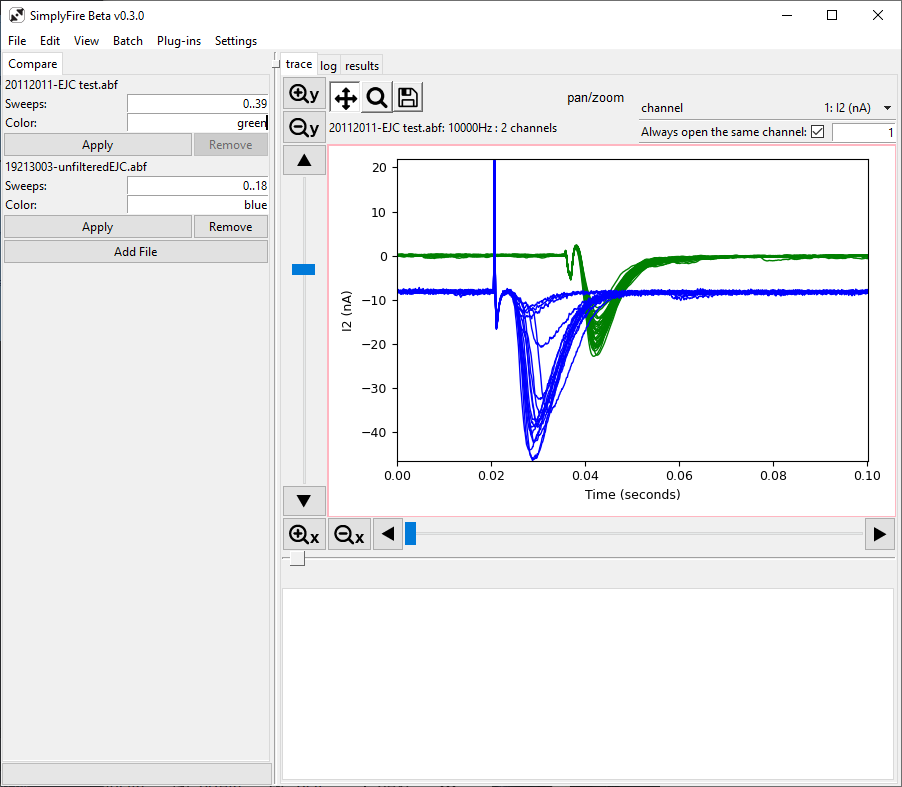
A typical layout of the Comparison Plugin
This plugin can be activated by View menu -> Comparison.
The plugin can be used in continuous mode or overlay mode.
Tab title: Compare
Controls
- Add File
Prompts user to select a recording file to open.
- Sweeps
This entry appears for each file that is opened within the plugin.
i..jindicates a range from i to j, inclusive. i.e.[i:j]i,jindicates a list containing elements i and j. i.e.[i,j]- Color
This entry appears for each file that is opened within the plugin. Color can be specified as hex code (including the
#sign) or as a color name. See the matplotlib documentation for more details on supported color names.