Evoked Analysis Plugin
The purpose of this plugin is to facilitate analysis of evoked release.
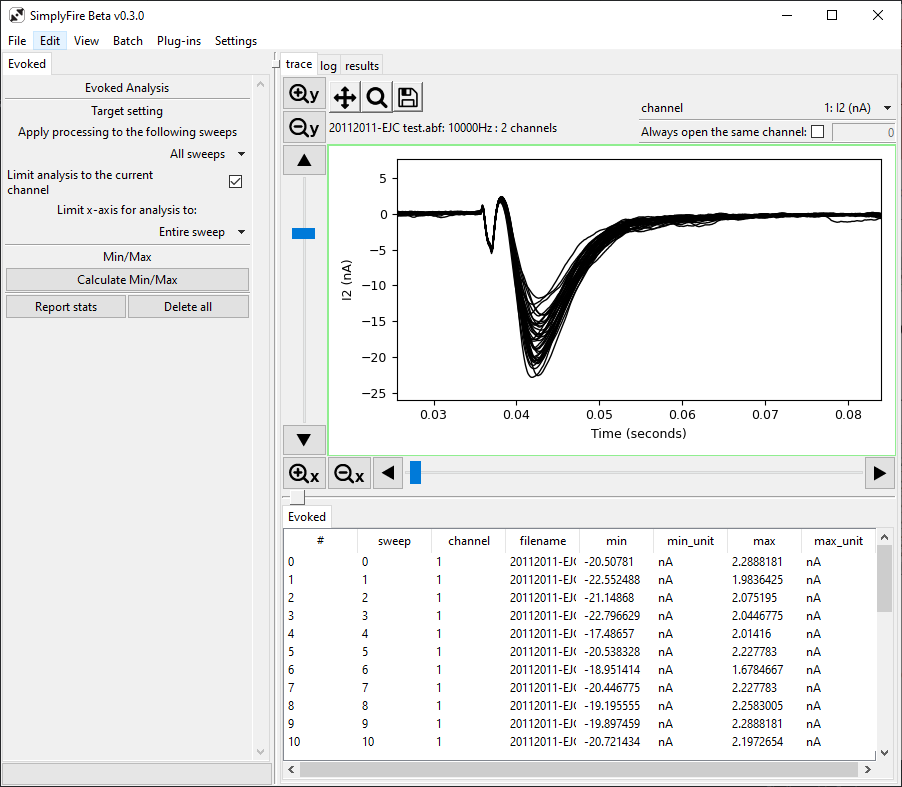
A typical layout of the Evoked Analysis Plugin.
- Requirements:
Tab title: Evoked
Target setting
Processing algorithm can be applied to all or a subset of the recording data.
- Apply processing to the following sweeps
Select between
All sweeps,Visible sweeps,Highlighted sweepsProcessing algorithm will be applied to the corresponding sweeps. Visibility and highlight of sweeps can be changed in the Sweeps Plugin and are only applicable in theoverlaymode.- Limit process to the current channel
Toggle this on to limit the scope of the algorithm to the current channel. Setting this option off will cause the processing to be applied to all channels.
- Limit x-axis for analysis to
Select between
Entire sweep,Visible window,Defined range. Processing algorithm will be applied to the specified x-axis limits.
Min/Max
This section calculates the minimum and maximum values per sweep. It is recommended to perform baseline subtraction prior to Min/Max calculation if the goal of the analysis is to extract the amplitude of the synaptic activity in each sweep.
- Calculate Min/Max
Extracts the minimum and maximum value per sweep within the specified x-axis limits. Results are listed in the data-panel located below the trace plot.
Data-panel
Results from the calculations are entered into the data-panel.
New data are appended to existing entries unless a new recording file is opened. The data are cleared when a new file is opened.
An entry can be selected by left click
Multiple entries can be selected by left click + Shift or left click + Ctrl.
Pressing Delete/Backspace/e deletes the entries in the data-panel and associated mini markers on the trace.